

What Is Google Maps and How Does It Help Your Business? Complete Setup Guide and Benefits
In today’s digital world, customers expect to find businesses online within seconds. Whether they are looking for a restaurant, a clothing store, a repair service, or a local marketing agency, most people start their search on Google. One of the most powerful tools that helps businesses become visible online is Google Maps.
Google Maps is no longer just a navigation platform. It has evolved into a powerful local marketing tool that helps businesses attract customers, increase visibility, build trust, and generate more sales. Companies of all sizes from small local shops to large enterprises use Google Maps to reach potential customers in their area.
This guide explains what Google Maps is, how it helps businesses grow, how to set it up correctly, and the major benefits it offers.
What Is Google Maps?
Google Maps is a web-based mapping and navigation service developed by Google. It allows users to search for locations, get directions, view satellite imagery, check traffic conditions, and discover nearby businesses.
When users search for terms such as:
- Restaurants near me
- Digital marketing agency
- Mobile repair shop
- Best bakery in town
- Car service center
Google often displays a map section showing nearby businesses. These listings are powered by Google Maps and Google Business Profile.
Businesses that appear on Google Maps can display important information including:
- Business name
- Address
- Phone number
- Website
- Business hours
- Customer reviews
- Photos
- Products and services
- Directions
This information helps potential customers quickly decide whether they want to contact or visit a business.
Why Google Maps Is Important for Businesses
Millions of people use Google Maps every day to find local businesses. When your business appears in map results, you gain access to customers who are actively searching for services you provide.
Many local searches result in immediate actions such as:
- Phone calls
- Website visits
- Direction requests
- Store visits
- Purchases
Unlike traditional advertising, Google Maps connects businesses with users who already have purchase intent.
For example, if someone searches “coffee shop near me,” they are likely looking for a place to visit right away. Appearing in those search results can generate instant customers.
Major Benefits of Google Maps for Businesses
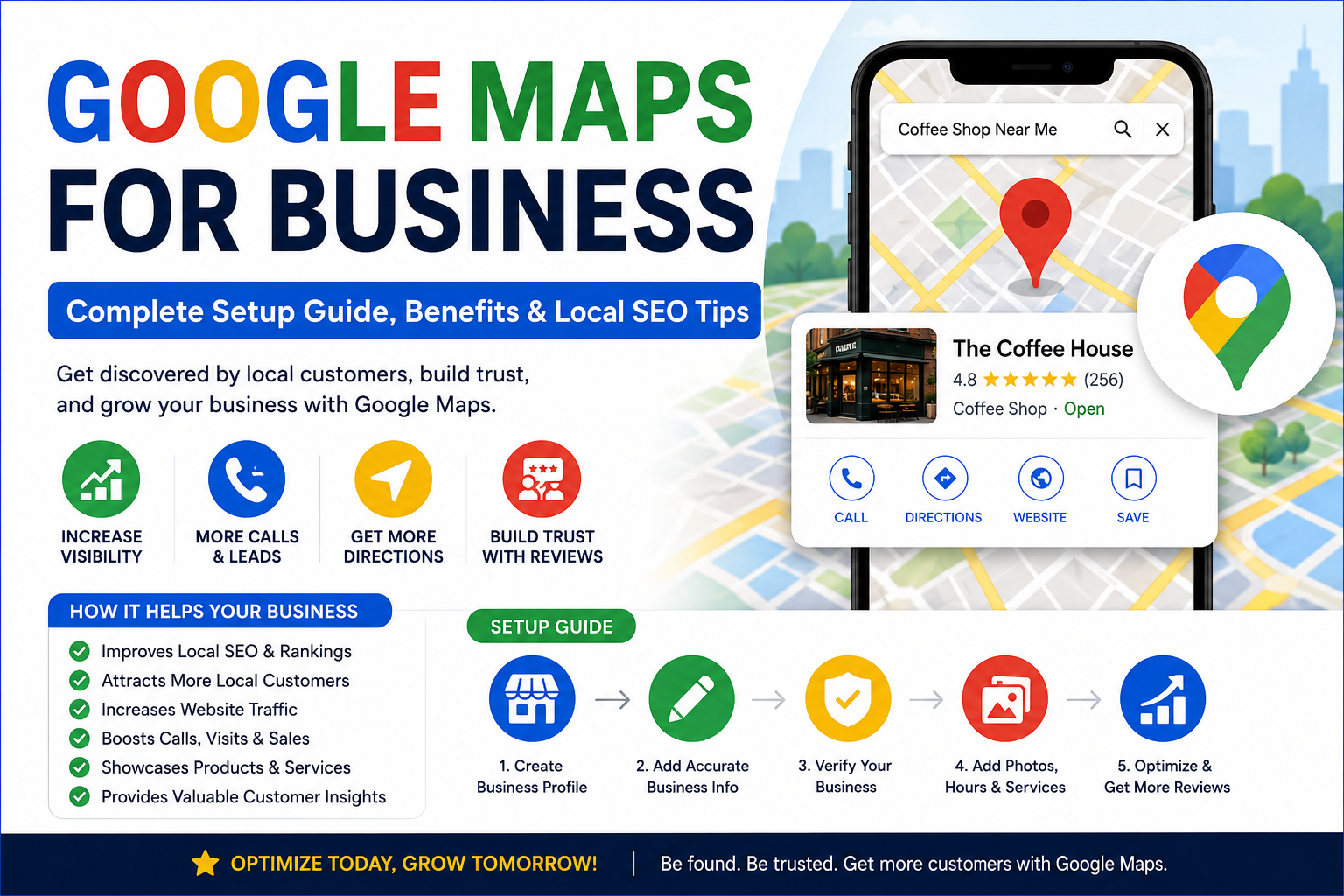
1. Increased Online Visibility
Google Maps helps businesses appear in local search results.
When customers search for products or services in their area, Google often shows a map pack featuring three top business listings. Being included in these results significantly increases visibility.
The more visible your business becomes, the more opportunities you have to attract customers.
2. Improved Local SEO
Local SEO focuses on helping businesses rank for location-based searches.
Google Maps plays a major role in local SEO because Google considers factors such as:
- Business location
- Reviews
- Profile completeness
- Relevance
- Customer engagement
A properly optimized Google Maps listing can improve your rankings and help your business appear above competitors.
3. More Website Traffic
Your Google Maps profile includes a link to your website.
When customers find your listing and want more information, they can click through to your website.
This can increase:
- Organic traffic
- Leads
- Sales inquiries
- Online purchases
4. Increased Phone Calls
Many customers prefer calling businesses directly.
Google Maps displays your phone number prominently, making it easy for users to contact you with a single click.
Businesses often receive valuable leads directly from map listings.
5. Better Customer Trust
Customer reviews are one of the strongest trust signals online.
Google Maps allows customers to leave ratings and reviews about their experiences.
Positive reviews help build credibility and encourage new customers to choose your business over competitors.
6. Free Marketing Opportunity
Creating and maintaining a Google Maps listing is free.
Unlike paid advertising, Google Maps provides long-term visibility without requiring a large marketing budget.
Small businesses can compete effectively with larger brands by optimizing their listings.
7. Showcase Products and Services
Google allows businesses to display:
- Products
- Services
- Menus
- Pricing information
- Special offers
This gives customers a clear understanding of what your business provides before they visit.
8. Customer Insights and Analytics
Google Business Profile provides useful analytics including:
- Number of profile views
- Search queries
- Website clicks
- Phone calls
- Direction requests
These insights help businesses understand customer behavior and improve marketing strategies.
How Google Maps Works for Businesses
Google Maps uses information from Google Business Profiles to display businesses in search results.
When users perform local searches, Google evaluates:
Relevance
How closely your business matches the user’s search query.
Distance
How close your business is to the searcher’s location.
Prominence
How well-known and trusted your business appears online.
Factors influencing prominence include:
- Reviews
- Ratings
- Backlinks
- Citations
- Profile completeness
- Website authority
The stronger these signals, the higher your chances of ranking.
Step-by-Step Google Maps Setup Guide
Step 1: Create a Google Account
If you do not already have one, create a Google account.
Using a business email address is recommended for professional management.
Step 2: Create a Google Business Profile
Visit Google’s Business Profile platform and start creating your listing.
Provide:
- Business name
- Category
- Address
- Phone number
- Website URL
Ensure all information is accurate and consistent.
Step 3: Choose the Correct Business Category
Selecting the right category is extremely important.
Examples include:
- Restaurant
- Marketing Agency
- Dentist
- Real Estate Agency
- Auto Repair Shop
Your category helps Google understand your business and match it with relevant searches.
Step 4: Add Business Location
Enter your physical address.
If you serve customers at their locations, you can define a service area instead of displaying an address.
Step 5: Add Contact Information
Include:
- Phone number
- Website URL
- Email address (optional)
Customers should be able to contact your business easily.
Step 6: Verify Your Business
Google requires verification before your listing becomes fully active.
Verification methods may include:
- Video verification
- Phone verification
- Email verification
- Postcard verification
Complete the verification process as instructed by Google.
Step 7: Upload High-Quality Photos
Businesses with photos generally receive more engagement.
Upload:
- Logo
- Storefront images
- Office photos
- Team photos
- Product images
High-quality visuals increase customer confidence.
Step 8: Add Business Hours
Clearly display:
- Opening hours
- Closing hours
- Holiday schedules
Accurate hours help prevent customer frustration.
Step 9: Add Products and Services
Include detailed information about what your business offers.
Examples:
- SEO services
- Plumbing repairs
- Haircuts
- Restaurant menu items
The more information you provide, the better.
Step 10: Optimize Your Business Description
Write a detailed business description containing relevant keywords naturally.
Describe:
- Services
- Experience
- Unique selling points
- Customer benefits
Avoid keyword stuffing.
Tips to Rank Higher on Google Maps
Collect More Reviews
Customer reviews strongly influence rankings.
Encourage satisfied customers to leave honest reviews.
Always respond professionally to both positive and negative feedback.
Keep Information Updated
Regularly update:
- Phone numbers
- Business hours
- Services
- Photos
Google prefers active and accurate profiles.
Add Fresh Photos
Edit your Business Profile – Businesses that frequently upload photos often receive more visibility and engagement.
Post Regular Updates
Google Business Profile allows posting:
- News
- Promotions
- Events
- Announcements
Regular updates signal activity and relevance.
Build Local Citations
List your business consistently across:
- Local directories
- Industry directories
- Business listings
Consistency improves trust and rankings.
Optimize Your Website
A strong website supports better map rankings.
Focus on:
- Mobile optimization
- Fast loading speeds
- Local keywords
- Quality content
Earn Quality Backlinks
Links from reputable websites increase authority and can improve local search performance.
Common Google Maps Mistakes to Avoid
Incomplete Profiles
Missing information can reduce visibility and customer trust.
Complete every available section.
Incorrect Contact Information
Outdated phone numbers or addresses can lead to lost customers.
Ignoring Reviews
Failing to respond to reviews can hurt your reputation.
Using Low-Quality Photos
Poor images create a negative impression.
Keyword Stuffing Business Names
Adding excessive keywords to your business name violates Google’s guidelines and may result in suspension.
Future of Google Maps for Business
Google Maps continues evolving with new technologies including:
- AI-powered recommendations
- Enhanced local search
- Voice search integration
- Augmented reality navigation
- Advanced customer insights
As mobile and local searches continue growing, Google Maps will become even more important for businesses seeking online visibility.
Conclusion
Google Maps has become one of the most valuable tools for local businesses. It helps companies increase visibility, attract customers, improve local SEO, generate leads, and build trust without requiring a large advertising budget.
By creating and optimizing a Google Business Profile, businesses can appear in local search results when customers are actively looking for products and services. Features such as reviews, photos, directions, and business information make it easier for customers to choose your company over competitors.
Whether you operate a small local shop or a growing enterprise, investing time in Google Maps optimization can deliver long-term benefits, increased traffic, more leads, and higher revenue. Businesses that embrace Google Maps today will be better positioned to succeed in the increasingly competitive digital marketplace.
0 Comments